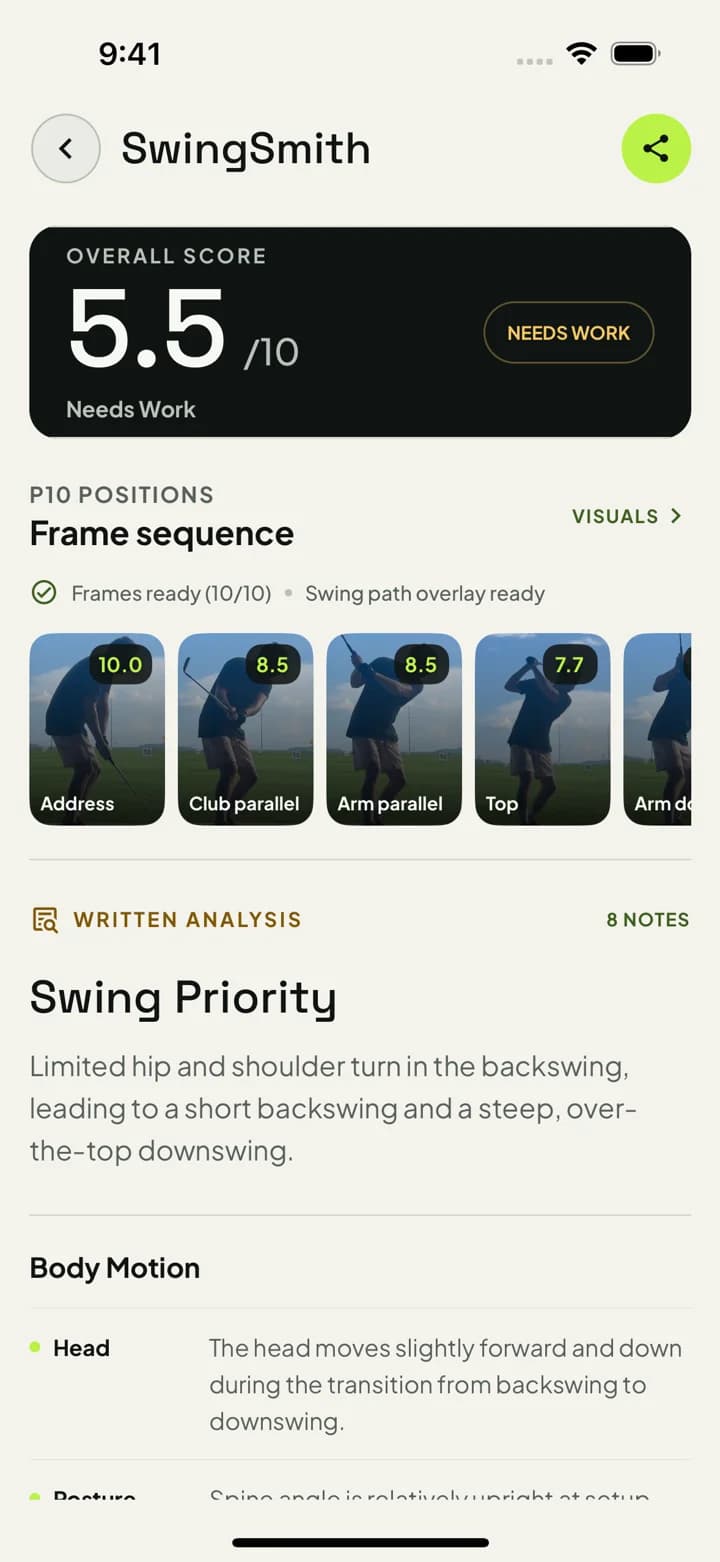
The free path is simple: use the mobile app, upload one clear swing, and decide from the actual result. Uploads do not happen on this website.
Record a normal swing on your phone.
Upload inside the iOS or Android app.
Review the score, P10 sequence, visuals, and written priority.
Keep the result in swing history so follow-up questions have context.
Upgrade only when the result is useful enough to keep going.
Current App Store proof: 4.3 stars from 12 public ratings.
How the free start works
1. Install SwingSmith
Start in the mobile app so your upload, result, history, visuals, and Ask Brody follow-up stay connected.
2. Upload one swing
Use a clear down-the-line or face-on video with the golfer, hands, club, ball, and finish in frame.
3. Read the priority
Use the analysis to choose the next practice target instead of trying to fix everything at once.
4. Decide before you pay
The free start is meant to prove the feedback style on your own swing before you upgrade.
What the first result should help you decide
P10 frame sequence
See where the movement pattern starts across key swing positions.
One practice priority
Leave with the most useful next focus for the range, home net, simulator, or lesson prep.
Swing history context
Keep the result connected to past and future uploads instead of treating it as a one-off report.
Ask Brody follow-up
Ask for drills, feels, and clarification after the result is available in the app.
Free analyzer tradeoff
Choose the free path that matches what you need next
Some free analyzers are built for the fastest possible browser check. SwingSmith is built for golfers who want the first result to become part of a practice record, with history and Ask Brody follow-up available inside the app.
Browser or no-download analyzer
Useful when you want the fastest possible one-off test and do not care whether the result connects to future swings.
SwingSmith app-connected analyzer
Useful when you want the first result, swing history, P10 checkpoints, and Ask Brody follow-up to stay together.
Hardware or sensor analyzer
Useful when the main question is ball flight, launch, spin, carry, club delivery, or device-specific practice data.
SwingSmith gives new users free starter access in the mobile app. The free start is designed so you can test the AI swing analysis workflow on your own video before deciding whether to upgrade.
Can I upload a swing directly on this website?
No. SwingSmith analysis runs inside the iOS and Android app. The website explains the workflow and sends you to the correct app store.
Why does SwingSmith use an app instead of a no-download browser upload?
The app keeps upload, result, swing history, visuals, and Ask Brody follow-up connected. That matters if you want to compare future swings instead of getting a one-off browser report.
What video should I record?
Use a clear face-on or down-the-line swing video with good lighting, the full body visible, and the club in frame from setup through finish.
What do I get after the analysis?
You get a swing score, P10 frame sequence, visual context, written notes, and a priority fix so your next practice session has one clear focus.
Do I need a launch monitor or sensor?
No. SwingSmith is designed around normal phone swing video. Hardware can be useful for ball-flight data, but it is not required for the app-based video analysis workflow.
Start here
Start free in the app
Download SwingSmith, upload a clear swing inside the app, and use the first result to decide what to practice next before upgrading.