
No-download browser analyzer
Best when you want the fastest possible one-off check and do not need saved swing history or follow-up context.
AI Golf Swing Analyzer
A 10-position breakdown and one clear practice priority, from your phone video.
Analyze My Swing FreeFirst analysis free. No card required.
Create a free account on iOS or Android.
Example result from the app
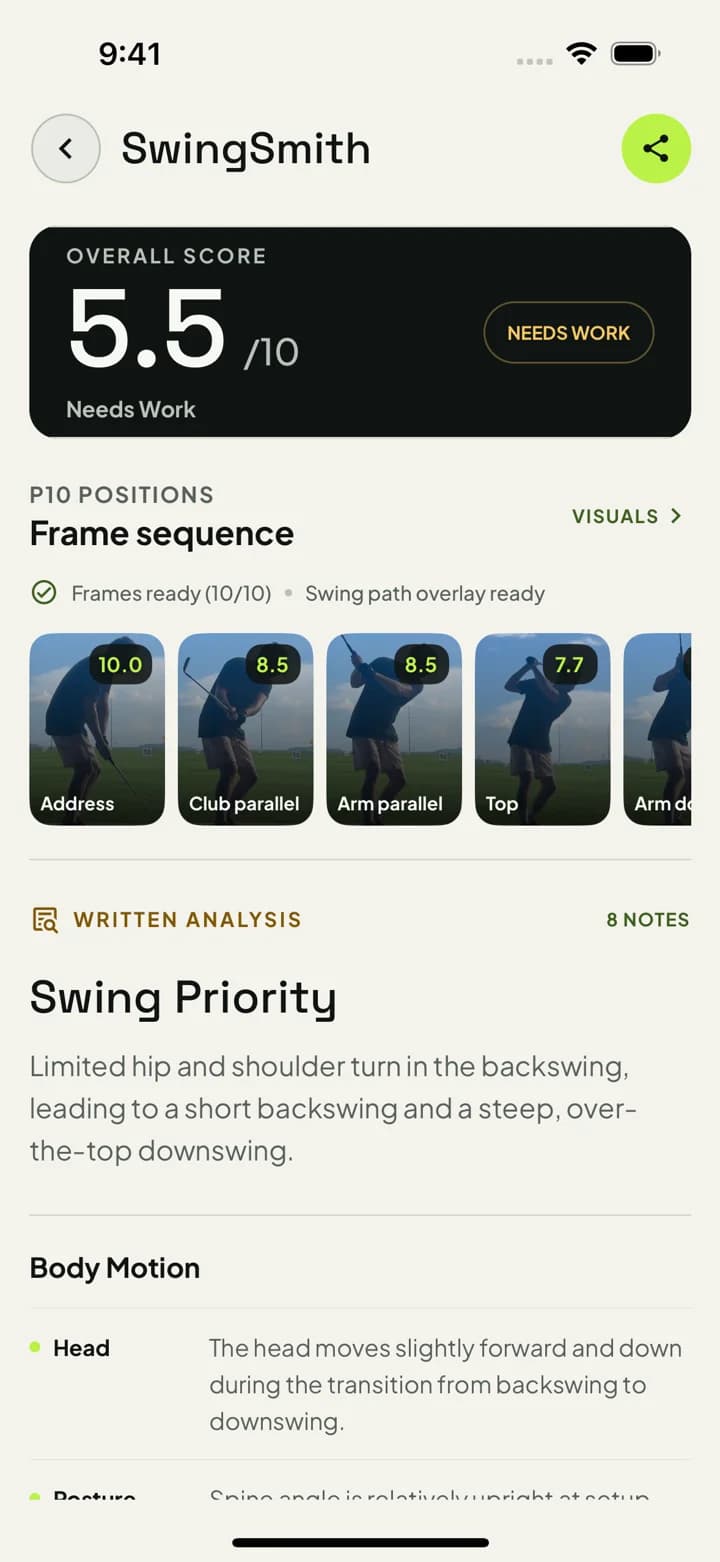
The priority: hip and shoulder turn.
This golfer’s feedback flags limited hip and shoulder turn in the backswing. Your result comes from your own swing.
How to read an analysis resultVisuals and Ask Brody require a paid plan.
Last updated: September 29, 2026
Record a normal swing on your phone, open the iOS or Android app, and upload the video there. The result shows a swing score, a 10-position frame sequence, supported movement checks, written notes, and one practice priority for your next range session. Paid plans add more analyses and coaching tools when you are ready to keep practicing.
Measurement limits
SwingSmith estimates visible movement from a clear face-on or down-the-line video. A check may be skipped when framing, camera angle, or body landmarks are not usable. It does not measure ball flight, launch, spin, carry, or tour-level 3D biomechanics, and one clip cannot prove every swing pattern.
See every supported measurementApp vs no-download analyzer
A browser upload can be useful for a quick look. SwingSmith is built for the next step: saving the swing, reviewing the P10 sequence, asking Ask Brody follow-up questions, and comparing future uploads against the same practice priority.
Best when you want the fastest possible one-off check and do not need saved swing history or follow-up context.
Best when you want the result, P10 sequence, swing history, and Ask Brody follow-up to stay connected for practice.
Best when the next decision depends on lesson context, launch data, spin, carry, or a facility review process.
Review balance and finish symmetry across supported swing positions.
Check posture angle, posture change, and finish posture from a down-the-line video.
Estimate weight-shift patterns when the swing is recorded from a usable face-on angle.
Review supported hip-turn, hip-sway, and hip-depth measurements for the chosen camera view.
Check supported shoulder turn, tilt, drift, and plane measurements across the swing.
Review supported head-stability and head-drift measurements from phone video.
A single next change so your practice session has a clear target.
Setup, takeaway, top, transition, impact, release, and finish checkpoints.
Drills and follow-up prompts through Ask Brody when you need the next detail.
SwingSmith also works as an AI golf swing coach app: the analysis gives the starting point, then Ask Brody helps turn the result into drills, feels, and a tighter next practice session.
SwingSmith uses one free starter analysis so you can see feedback on a real swing before paying. Premium plans unlock more analysis depth, swing history, and coaching tools when you are ready to keep using it.
The recorded App Store observation is 4.3 stars from 12 public ratings (checked Sep 8, 2026). Open the listing for the latest rating and written reviews.
Read App Store ReviewsYes. New users get free starter access in the mobile app. Install the app, upload one clear swing, and review the score, P10 sequence, written notes, and one practice priority before deciding whether to upgrade.
The supported checks include balance, posture, head movement, hip and shoulder movement, weight shift, and early extension. The exact checks depend on whether the video is face-on or down the line and whether the camera view is usable.
No. SwingSmith analysis runs inside the iOS and Android app so your uploads, results, history, and coaching workflow stay connected.
Use a browser analyzer when you only need a quick one-off check. Use SwingSmith when you want the analysis result, P10 checkpoints, swing history, and Ask Brody follow-up to stay connected across practice sessions.
SwingSmith uses a 10-position breakdown and applies the movement checks supported for the camera view. The public measurement catalog lists every current measurement type and its limits.
Most golfers should expect to get feedback in minutes after uploading a clear swing video from the app.
It is useful for weekend golfers, range practice, lesson prep, and players who want a clearer practice priority between coaching sessions.
Start here
Install SwingSmith, upload one swing, and use the result to decide whether the feedback is worth upgrading for more practice.